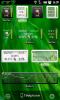
Battery Monitor Widget
|
Free Version |
Pro Version |
|
|
||
![]() |
The most complete tool to manage your battery: Shows historical data (%, mA, mW, mV and temperature), calculates estimated run-times and battery aging, helps calibrate battery and improve your battery run-time. Need help? Check out the online help pages! More questions? Visit the FAQ or the forums!
|
|
|
||
|
||
|
||
|
||
|
||
|
||
|
||
|
||
|
||
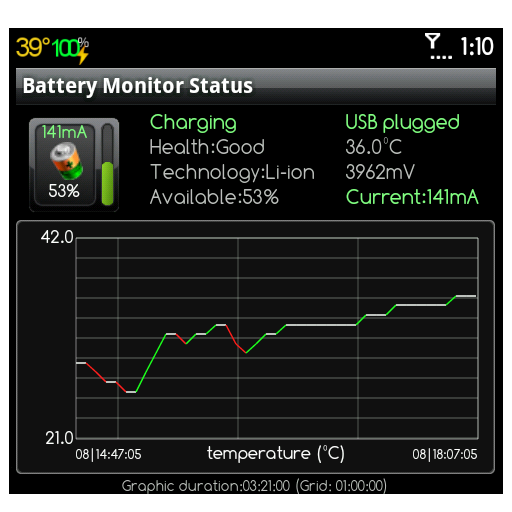
Lowest battery consumption on the market!
Disable history/graphics for even lower consumption!
Check-out these benchmarks.
Many thanks for the translation to
Max Peng - Chinese
Zuecho - German
Gabriele, Roberto & Raffaele - Italian
Rontgen - Japanese
Dio Seo - Korean
Ignacio - Spanish
ToddeSwe - Swedish
Ricardo - Protuguese
Lukas - Czech
Lukasz - Polish
Please use the forums to post questions.


Comments
Colors of the graphics
When I charge my phone the color of the line in Available (%) screen was and is usually green but the last time it was Blue. What does this mean? Also there is now a line disecting the graph and it hasn't always been there. Finally at the bottom of the screen there's a line titled screen with little yellow squares in different shades. This is something relatively new also. What do these mean or where can I find these answers at? Thank you very much,
Dennis/IdahoG1 RetiredG2x Hard at Work
The FAQ has been updated
The FAQ has 2 new questions:
BMW blue/green % curve
BMW history file content
The history file content numbers at the end determine the color shown on the graph or within the screen bottom line.
I've added those because I often find myself wondering if I used the phone or not while checking consumption. Hope you find those new features useful too!
3c@3c71.com
Manual update mA reading
Could you add a feature to manually take readings?
When I have the App opened (BMW), it would be great to hit the icon in the top left corner to get instantaneous measurement(s)? Ideally they would also be logged.
Thanks!
Interesting idea! Will be in next update
It will be a 'hidden' feature by tapping the top-left icon, and will show a toast message saying 'mA data updated and history logged'.
Note though that it will add a line in history and will shift the graphic accordingly, thus making it a little more unprecise each time it's updated.
Actually, I'll add the same feature to the mA text which will only update the value.
3c@3c71.com
Great, glad you like the idea
Great, glad you like the idea!
I'm not sure I understand how the manual data reading would make things less precise. I guess that having a graph with a varying time interval could be confusing. Is that what you meant? And the graphs are already a bit squeezed with the "limited" number of pixels on a phone screen.
Please be sure to make the Toast use the SHORT duration. (Even that I usually find a bit long, but I still haven't figured out a way for a user to over-ride the system Toast durations)
zero voltage points in history
i frequesntly find my estimates and statistics messed up by zero voltage data points in my history. I've seen this on both HTCClay's SuperCM7 and CM7.1RC1 on my HTC G2/Vision Is there a way for me to delete these?
only voltage is at 0?
Can you send me your history file? I will remove those for you, until I find a workaround for this. This will also help find the actual work-around.
3c@3c71.com
How can I get my droid x
How can I get my droid x display the data like percentage left and time left/voltage/temperature? All I managed to get was the icon, which does display that information when I slide it down. Sure would like to see it like it is diplayed on one of your screen shots.
Dieter Neumann
Did you get to the main app screen?
What do you mean by slide it down?
Assuming you got the widget on your home screen, you can tap on its label to access the settings and then change the widget appearance and data content.
If you tap on the widget itself, you access the main app, which displays % left, voltage, temperature and remaining/total capacity (mAh). At the bottom you have a button to access the estimates screen.
Does that help?
3c@3c71.com
mA graph range
Hi!
I installed BMW from Android Market two days ago.
Usage (mA) graph on vertical axis has minimum of -901 and in maximum (for charging) 32401 values. Shown graph is around - 100 mA. but it's stupid to have 32 A as maximum. how to ZOOM in or change values...???
... I just deleted History.
... I just deleted History. Seems it helped.
nevertheless, vertical zoom is a good feature.
BR.
Branimir
mA reading really depends on
mA reading really depends on the phone... It can read very differently, or actually be calculated by the app as some phones manufacturer didn't bother with this data.
Reading 32A is obviously wrong... Maybe some startup issue before it recognized your phone or the % adjusted dramatically fast.
In any case, you can long press a graphic (leads to a menu or the default full-screen). In the menu you get an option 'visible min/max'... This will automatically zoom vertically on what you're watching.
That and the horizontal zoom should help you zoom on any part of the graphs.
3c@3c71.com
messed up stats
i installed your app and uninstalled it. reason: something had fudged up my battery stats and after reboot or suddenly the battery dropped by 20-30 percent. just showed wrong info. on shuttin down the phone and charging it the green battery showed proper charged level. i was on froyo yesterday and had this problem. just upgraded to gingerbread (galaxy tab P1000) and the problem vanished. untill i just checked out your app today (my curiosity!) also your app never showed my proper battery stat but 1500 mah. please help.
Galaxy Tab doesn't report battery capacity, need override
The total battery capacity is not always reported by the device, and with your Galaxy Tab you can override it in the 'monitoring' settings.
Battery stats is usually the name of actual Android statistics that measures battery usage and are also used to calculate remaining capacity (in %). The more you use your device, the more Android will know about the battery and report more accurate %.
The app allows you to clear your battery stats (if phone is rooted) to restart what is often called a 'calibration' process. See here for more about this.
Clearing battery stats is also useful when get wrong %, or % range is not at its maximum, for example, stops charging at 99% instead of 100, or jumps from 90% to 100% when charging or switch off before reaching 1 or 0%
3c@3c71.com